Is someone else using your OpenAI or Anthropic key? How to tell in 5 minutes.
A stolen key leaves no trace in your code. It leaves one at the provider. Here is where to look, and what to do when the numbers don’t match.
When an OpenAI or Anthropic key leaks — from a commit, a CI log, a screenshot, a chat with an AI that read your .env — the person who finds it doesn’t use it from your code. They use it from their own computer. Your repository doesn’t change. Your logs don’t change. The only place the theft shows up is at the provider, in the usage of that key.
Secrets tied to AI services were the fastest-growing kind of leaked credential last year: GitGuardian counted 81% more of them in 2025 than in 2024. Here is how to check yours in about five minutes.
The signs
- The bill jumped and you shipped nothing that explains it.
- Calls at hours nothing of yours runs: 3 a.m. on a key only your laptop uses.
- Models you don’t call. Your app uses one small model; the key shows the biggest one.
- Usage on a key nothing uses any more — the old one from a demo, the one in a deleted branch.
- Rate-limit errors in your own app while your own traffic is normal.
Step 1 — see usage per key, per hour
Both providers break usage down by key, but only for an admin key (one only an organization owner or admin can create). Keep it out of your project and use it from your own terminal. Put it in an environment variable first; never paste it into a command or a chat.
OpenAI
The usage page in the OpenAI dashboard can filter by project and key. The same numbers come from the organization usage API, grouped by key, in one-hour buckets, for the last 48 hours:
START=$(( $(date +%s) - 172800 ))
curl -s "https://api.openai.com/v1/organization/usage/completions?start_time=$START&bucket_width=1h&group_by=api_key_id&limit=48" \
  -H "Authorization: Bearer $OPENAI_ADMIN_KEY"
Each bucket lists, per api_key_id, the requests and tokens in that hour. The key IDs map to names on the API keys page.
Anthropic
The Console’s usage page shows the same by key. From the Admin API, with an admin key (it starts with sk-ant-admin):
curl -s "https://api.anthropic.com/v1/organizations/usage_report/messages?starting_at=2026-11-03T00:00:00Z&bucket_width=1h&group_by[]=api_key_id" \
  -H "x-api-key: $ANTHROPIC_ADMIN_KEY" \
  -H "anthropic-version: 2023-06-01"
Usage from the Console’s Workbench has no key attached, so it shows up with an empty key ID — that one is people in your organization, not a thief.
Step 2 — put it next to what your code does
A number means nothing on its own. For each key, write down three things:
- Where it runs. Your laptop only? A server? CI? A key that lives only on your laptop can’t be busy while the laptop sleeps.
- What uses it. Which part of the code reads it. If nothing reads it any more, any usage at all is someone else.
- What it calls. Which models, roughly how much. A key your app uses for short classification calls shouldn’t be producing long answers from the largest model.
Now compare. Usage when nothing of yours runs, usage on a key nothing uses, or models you never call: that’s your answer.
Close everything that uses the key — the dev server, the scripts, the CI job — and watch the next hour’s bucket. If it still moves, the key is in use somewhere you don’t control.
Step 3 — if someone else is using it
- Make a new key, deploy it, then revoke the old one. In that order, so your own app doesn’t go down with the thief.
- Find where it leaked. Search your git history (including deleted branches), CI logs, issue trackers, shared screenshots and anything an AI assistant read. Removing it from the latest commit doesn’t remove it from history.
- Put a ceiling on the damage. Spend limits and budget alerts on the project, and one key per app or environment, so the next leak is small and easy to spot.
- Ask the provider about the charges. Both have a support route for usage you didn’t make; the per-hour numbers from step 1 are your evidence.
What ArgosBrain does here
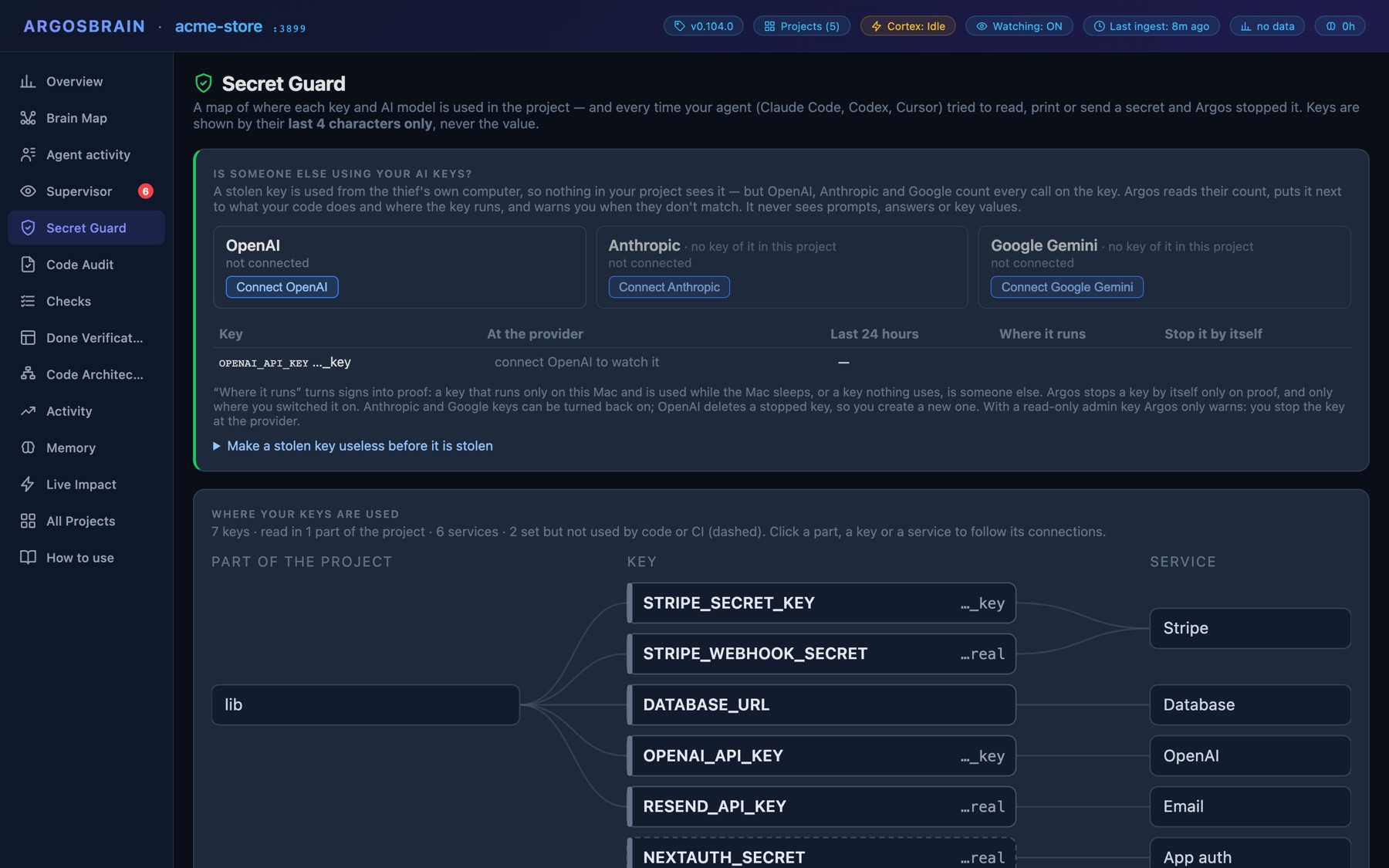
ArgosBrain does step 2 for you, continuously. It already knows from the code which part of your project reads each key. Connect OpenAI, Anthropic or Google and it reads the provider’s count of calls per key — never prompts or answers — and puts it next to what your code does and where the key runs. A key that runs only on your Mac and is busy while the Mac sleeps, or a key nothing uses, is treated as proof. You choose whether it then switches the key off by itself or only warns you; Anthropic and Google keys can be turned back on, while OpenAI deletes a stopped key, so you create a new one. With a read-only admin key it only warns, and you stop the key at the provider.
It also works the other way round: Secret Guard tells you when Claude Code, Codex or Cursor read, wrote or sent a key, so you know which ones to watch. How to keep keys out of the chat in the first place →
Sources
GitGuardian, The State of Secrets Sprawl 2026
Anthropic, Usage and Cost API
OpenAI Cookbook, Completions Usage API example